AWS 환경에서 CCM(MSP 있을때) 설정 방법
1. Datadog 공식 문서
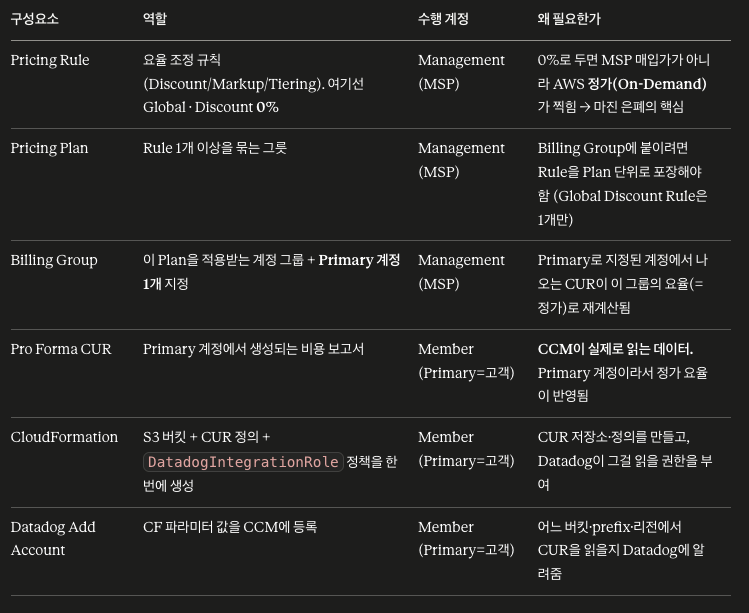
[상세 항목 정리]
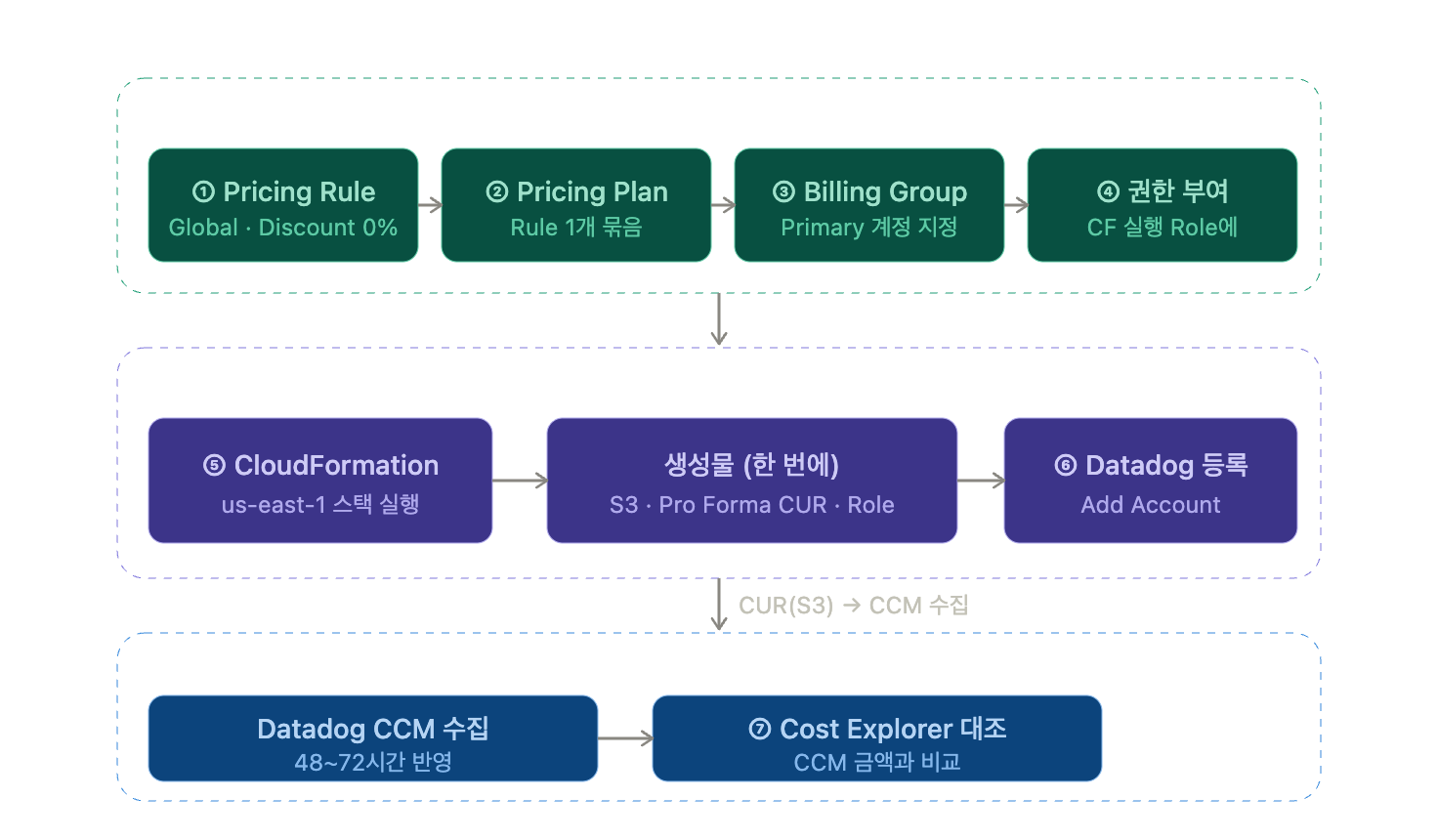
[완료까지 전체 흐름 - 아래 PDF 내용 정리한 것임]
A. Management Account (MSP가 수행)
- Pricing Rule 생성 — Scope
Global, TypeDiscount,0%(DatadogCcmPricingRule1) - Pricing Plan 생성 — 위 Rule 선택 (
DatadogCcmPricingPlan1) - Billing Group 생성 — Plan 선택, 대상 Member Account 포함, 그중 CUR 만들 계정을 Primary로 1개 지정 (
DatadogCcmBillingGroup1) - Member 계정의 CF 실행 Role에 권한 부여 —
ccm-cur-cloudformation-policy.json(s3 생성/정책, cur:Put/Describe/Delete, iam:PutRolePolicy 등). 이미 있는 권한은 중복 부여 불필요
B. Member Account (고객이 수행 )
- CloudFormation Stack 실행 — 반드시 us-east-1, 첨부된
CCM Cloudformation for MSP.yaml업로드- 파라미터 입력:
CloudCostBucketName,CloudCostBucketRegion,CloudCostReportPrefix,CloudCostReportName,CreateCloudCostBucket=true,CreateCloudCostReport=true DatadogIntegrationRole= 기존 AWS 통합에서 쓰던 Role (Datadog → Integration → AWS → 해당 계정 → AWS Role Name에서 확인)- 이 스택이 S3 버킷 + CUR 정의(Hourly/Parquet/RESOURCES) + Role 인라인 정책을 생성
- 마지막 페이지의 파라미터 값을 그대로 기록
- 파라미터 입력:
- Datadog에서 등록 — Cloud Cost > Settings > Add Account → Use connected AWS account → Manually → 5번 파라미터 값 입력 → Add Account
2. 설정 방법 (PDF)
1. MSP 설정 (AWS Billing Conductor & Pro Forma CUR)
2. 고객사 수행
- CloudFormation
![[CCM Cloudformation for MSP - 고객사 수행.yaml]]
# version: 0.0.1
AWSTemplateFormatVersion: 2010-09-09
Description: Datadog Cloud Cost Management Setup
Parameters:
  CloudCostBucketName:
    Type: String
    Description: The name of the S3 bucket for storing the cost and usage reports.
    MinLength: 1
  CloudCostBucketRegion:
    Type: String
    Description: The AWS region where the S3 bucket is located.
    MinLength: 1
  CloudCostReportPrefix:
    Type: String
    Description: The prefix to be added to the cost and usage report files in the S3 bucket.
    MinLength: 1
  CloudCostReportName:
    Type: String
    Description: The name of the cost and usage report.
    MinLength: 1
  DatadogIntegrationRole:
    Type: String
    Description: The name of the IAM role that has been integrated with Datadog.
    MinLength: 1
  CreateCloudCostReport:
    Type: String
    Default: true
    AllowedValues:
      - true
      - false
    Description: Whether a new Cost and Usage Report is created, or an existing one is used.
  CreateCloudCostBucket:
    Type: String
    Default: true
    AllowedValues:
      - true
      - false
    Description: Whether the S3 bucket for storing the Cost and Usage Report is created, or an existing one is used. Ignored if CreateCloudCostReport is false.

Conditions:
  ShouldCreateCloudCostReport:
    Fn::Equals:
      - Ref: CreateCloudCostReport
      - true
  ShouldCreateCloudCostBucket:
    Fn::And:
      - Fn::Equals:
          - Ref: CreateCloudCostBucket
          - true
      - !Condition ShouldCreateCloudCostReport # If CUR already exists, we don't need to create the bucket

Resources:
  DatadogCCMIAMPolicy:
    Type: AWS::IAM::RolePolicy
    Properties:
      PolicyName: !Sub "datadog-ccm-iam-policy--${CloudCostBucketName}-${CloudCostReportPrefix}-${CloudCostReportName}"
      RoleName: !Ref DatadogIntegrationRole
      PolicyDocument:
        Version: "2012-10-17"
        Statement:
          - Sid: ReadCloudCostBucket
            Effect: Allow
            Action:
              - s3:ListBucket
            Resource: !Sub "arn:${AWS::Partition}:s3:::${CloudCostBucketName}"
          - Sid: GetBill
            Effect: Allow
            Action:
              - s3:GetObject
            Resource: !Sub "arn:${AWS::Partition}:s3:::${CloudCostBucketName}/${CloudCostReportPrefix}/${CloudCostReportName}/*"
          - Sid: CheckAccuracy
            Effect: Allow
            Action:
              - ce:Get*
            Resource: "*"
          - Sid: ListCURs
            Effect: Allow
            Action:
              - cur:DescribeReportDefinitions
            Resource: "*"
          - Sid: ListOrganizations
            Effect: Allow
            Action:
              - organizations:Describe*
              - organizations:List*
            Resource: "*"

  DDCloudCostBucket:
    Condition: ShouldCreateCloudCostBucket
    Type: AWS::S3::Bucket
    Properties:
      BucketName: !Ref CloudCostBucketName

  DDCloudCostBucketAccessPolicy:
    Condition: ShouldCreateCloudCostBucket
    Type: AWS::S3::BucketPolicy
    Properties:
      Bucket: !Ref DDCloudCostBucket
      PolicyDocument:
        Version: "2012-10-17"
        Statement:
          - Effect: Allow
            Principal:
              Service:
                - billingreports.amazonaws.com
                - bcm-data-exports.amazonaws.com
            Action:
              - s3:PutObject
              - s3:GetBucketPolicy
            Resource:
              - !Sub ${DDCloudCostBucket.Arn}
              - !Sub ${DDCloudCostBucket.Arn}/*
            Condition:
              StringLike:
                aws:SourceArn:
                  - !Sub arn:*:cur:*:${AWS::AccountId}:definition/*
                  - !Sub arn:*:bcm-data-exports:*:${AWS::AccountId}:export/*
                aws:SourceAccount: !Sub ${AWS::AccountId}

  # DDCURReportDefinition can only be done after the bucket is created
  # and has the right policies. The bucket is only created if ShouldCreateCloudCostBucket
  # is true. DependsOn does not work with Conditions, so we use a WaitCondition
  # There are 2 wait handles,
  # - BucketWaitHandle: for the bucket if bucket should be created
  # - EmptyWaitHandle: for empty wait condition if bucket should not be created
  # BucketWaitCondition to join them and be used as a dependency for DDCURReportDefinition
  # More info here - https://garbe.io/blog/2017/07/17/cloudformation-hacks/
  BucketWaitHandle:
    Condition: ShouldCreateCloudCostBucket
    DependsOn: DDCloudCostBucketAccessPolicy
    Type: "AWS::CloudFormation::WaitConditionHandle"

  EmptyWaitHandle:
    Type: "AWS::CloudFormation::WaitConditionHandle"

  BucketWaitCondition:
    Type: "AWS::CloudFormation::WaitCondition"
    Properties:
      Handle:
        !If [
          ShouldCreateCloudCostBucket,
          !Ref BucketWaitHandle,
          !Ref EmptyWaitHandle,
        ]
      Timeout: "1"
      Count: 0

  DDCURReportDefinition:
    Condition: ShouldCreateCloudCostReport
    DependsOn: BucketWaitCondition
    Type: AWS::CUR::ReportDefinition
    Properties:
      AdditionalSchemaElements:
        - RESOURCES
      Compression: Parquet
      Format: Parquet
      RefreshClosedReports: true
      ReportName: !Ref CloudCostReportName
      ReportVersioning: CREATE_NEW_REPORT
      S3Bucket: !Ref CloudCostBucketName
      S3Prefix: !Ref CloudCostReportPrefix
      S3Region: !Ref CloudCostBucketRegion
      TimeUnit: HOURLY
- CCM연동 가이드 - 고객사 수행